Showing posts with label INNOVATION. Show all posts

Sunday, October 4, 2015

Running an application through the emulator intel XDK

Running an application through the emulator intel XDK, Now let's run our application again, as before, click the Emulate in the top menu.

Then the display will be re-routed to Emulate look like the following:

Now, please try to click the button marked "Hello World Button" on our application. Supposedly when the button is clicked will change the text below into reads "Hello World Intel XDK".

On the menu at the top, there is a reload button and slider application to zoom in and zoom out device. Click the reload button to reload the application of the application being diemulate to return to the initial conditions and use the slider to zoom in and zoom out to set the display magnification device.


And on the bar left and right on the display, there are several functions Emulate to help us clicking Emulate our application. There is a menu Device to replace choice of devices that are used to clicking Emulate our application. There are also menu Accelerometer, Device and Network Settings, and Geo Location. It was all to help clicking Emulate us in our application in a wide range of possibilities and conditions.

Now please try to replace the device that we use to clicking Emulate our Hello World application. On the bar to the left, part of the Device menu there is a button dropdown that contains a list of devices that can be used. Click it and select the device you want.

Here is the view of our application in the Nokia Lumia 920:

Even on an iPad:

How to add the code to the action program intel XDK

First of all, in the upper left hand part, on the menu bar at the top of our file hierarchy, click the button Editor.
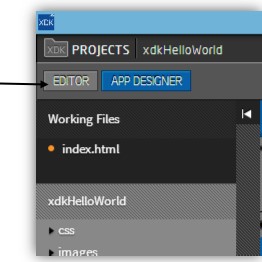

Then we will be given a code editor view program filled with letters and characters such as the following:
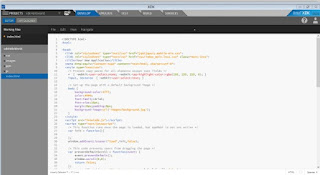

File hierarchy on the bar, make sure that the selected file is the index.html file for ensure that the program code that is currently open is the program code belongs index.html.

Next, let's focus on open source code editor, and let's begin activity coding. The language that will be used are the HTML language, seen from the file extensions that are we open, ie .html. Probably most of you are familiar with HTML language this. For those not familiar, can learn more about HTML language on the module Special Session of the HTML language. Modules are widely available in HTML, books that discuss special about HTML language was widely available in bookstores.
Yes, seriously, we will create mobile applications using HTML language passable familiar to you. Really the HTML language. Additionally there may be in code Javascript which we will add and code of additional libraries. For know how easy, let's get started.
First of all, let's see the result of our work before adding the element on the canvas. Drag and drop the activity actually will automatically generate HTML code. Please scroll your code until you find a code like the following:


If it is difficult to find, essentially find the line the following code:
<div class = "widget-container content-area vertical-col">
We mean program code is program code within the <div> that. If there is a slight difference, no problem, there may be differences when Intel XDK generating code of our program. On the lines of program code below, look at the program code section:


It is a line of code that is generated when we create a Button element. In section indicated arrows, it is the results generated code of attributes that we input when creating the button. There is an attribute Id and Label. Then look also on the line following code:

Can guess and find yourself element is it? Yes, it is an element Text with the id attribute "txtHelloWorld" and Text "first application in Intel XDK". In conclusion, when we do the layouting with App Designer, we actually was to shorten our work step by allowing Intel XDK generate HTML code for our own.
Now, let's go to the stage of the action program giving orders. Please find the line of code the following program:

Seen in the program code line numbers in the picture above, it appears that the lines of code The program is on the line 25-49. Or maybe disparate thin on the line of code program belongs to you. It is a program code by the JavaScript language. On the development of applications using the Intel XDK or other HTML5 applications, command code program for action using the JavaScript language. The above code is the code basic commands are automatically generated by Intel XDK.

Now we will add a code to command the new program of action, we will save the code before the tag on the bottom of the lid element </ script> namely as indicated by arrows in the figure below:
Lines of source code is as follows, please typed in that section:
showHelloWorld function () {
       $ ("# txtHelloWorld"). text ("Hello World Intel XDK");
    }
So the appearance of the lines of program code is as follows:

Perhaps most of you not familiar with the intent of the program code. JavaScript is a language code with an additional jQuery Mobile library (which we have chosen at the beginning of the development of applications). The code is a function named showHelloWorld () that when called will replace text attributes to "Hello World Intel XDK" of an element in applications that have an id "TxtHelloWorld". Where elements in our application that has the id is Text we created earlier. In short, these functions when called will make Text elements that we created earlier changed Text attributes or contents of the text into "Hello World Intel XDK".
Next to be executed, the function must be called first showHelloWorld first. We will call these functions when the button Hello World we have created previously untouched (using a finger on the smartphone or if clicked on a computer PC).
The trick, first find the line of program code that is lines of program code which has generated Intel XDK for buttons that we have made, namely a line of code The following program we have discussed above when we first entered the display Editor code:

Add a new program code on <a> element before the closing tag in the form of elements brackets lid as shown in the arrow in the picture above. Code program are as follows:
ontouchstart = "showHelloWorld ()"
So that the lines of code to the button is as follows:


Visible now that in addition to the class attribute, a data-UIB, a data-role, and id, there is a new attribute that is ontouchstart. This attribute serves to defines that when the elements get a touch on the input form device later (on the PC in the form of clicks), it will call the function showHelloWorld () that we have created and defined previously.
In the next article will discuss how to run an application that we created the Intel XDK emulator application.

Saturday, October 3, 2015

How to make HHVM service runs all the time

How to make HHVM service runs all the time. In this paper the authors will provide solutions for web application developers, in this case the author uses Wrdpress for web applications that run using MariaDB, Nginx and HHVM for alternative php, HHVM known to be very lightweight and can respond quickly reques of web application users.
In this case the author use VPS digitalocean with droplet specification as follows, for the ram and 1 512 processor cores. With debian 7 operating system 64-bit architecture.
I install the application supervisor to manage and maintain service HHVM to remain always running on our server. For more details you can play the following video below:


I include the contents of the config file in the video above:
Content of file : supervisor / hhvm.conf

[program:hhvm]
command=/usr/bin/hhvm -c /etc/hhvm/php.ini -c /etc/hhvm/server.ini -m server
     -vPidFile=/var/run/hhvm/pid
     -vServer.FileSocket=/var/run/hhvm/hhvm.sock
     -vRepo.Central.Path=/var/run/hhvm/hhvm.hhbc
directory=/var/www
numprocs=1
autostart=true            ; start at supervisord start (default: true)
autorestart=unexpected    ; auto restart if HHVM dies
startretries=3
user=www-data  ; setuid to this UNIX account to run the program

[program:nginx]
command=nginx
user = root
autostart=false
#autorestart=unexpected
supervisor / hhvm2.conf
[program:hhvm2]
command=/usr/bin/hhvm -c /etc/hhvm/php.ini -c /etc/hhvm/server.ini -m server
     -vPidFile=/var/run/hhvm/pid2
     -vServer.FileSocket=/var/run/hhvm/hhvm2.sock
     -vRepo.Central.Path=/var/run/hhvm/hhvm.hhbc
directory=/var/www
numprocs=1
autostart=true            ; start at supervisord start (default: true)
autorestart=unexpected    ; auto restart if HHVM dies
startretries=3
user=www-data  ; setuid to this UNIX account to run the program

[program:nginx]
command=nginx
user = root
autostart=false
#autorestart=unexpected
Content of file : /hhvm/server.ini

; php options

pid = /var/run/hhvm/pid

hhvm.server.type = fastcgi
hhvm.server.default_document = index.php
hhvm.log.level = Warning
hhvm.log.always_log_unhandled_exceptions = true
hhvm.log.runtime_error_reporting_level = 8191
hhvm.log.use_log_file = true
hhvm.log.file = /var/log/hhvm/error.log
hhvm.mysql.typed_results = false

hhvm.jit = 1
hhvm.eval.jit_warmup_requests = 1

hhvm.keep_perf_pid_map = 0
hhvm.perf_pid_map = 0
hhvm.perf_data_map = 0

hhvm.server.apc.enable_apc = true
Content of file : /nginx/conf.d/upstream.conf
# Common upstream settings
upstream php {
server unix:/var/run/hhvm/hhvm.sock;
server unix:/var/run/hhvm/hhvm2.sock backup;
}
For questions about hhvm you can leave kometar below. Credit for $10 free for you on digitalocean, you can get this from my link.

Stages menu intel XDK for developers

If we look at the upper part of Intel XDK applications, there will be a menu like in the picture below:


Each of these menu represents the phase of development on the Intel XDK is as follows:

Develop
This stage is the stage when the application was made and developed. There are two options development at this stage is the Editor and Designer App. In the choice of our Editor Coding and can perform activities on the App Designer options we can do layouting activity.

Emulate
At this stage we make the applications tested to be simulated when running on the device later. There are a lot of menus to perform simulations such as accelerometer, geolocation, Network, Events, and others.

Test
At this stage we create applications that will try to run on the original device. That necessary to perform this stage is that we first need to install App Lab applications on the device that will be a place we try our application. Later, on the App Lab we can open applications that we develop the we push to the server during this test phase. App Lab application is available for devices with iOS and Android platform.

Build
This stage is the stage when we dibuild application into an application for each platform we choose. The way is easy that simply by clicking one of the platforms on the menu in the Build stage is the application we will be uploaded to the server and the server will be returned in the form of an application package that is ready to install or published in the platform that we have chosen

Services
This stage is actually optional additional step if we want to use services provided to do things such as putting an ad in the application us, to track performance of our applications, and others.

After Install Intel XDK Development Tools

 Initial View Intel XDK
At the time of first opened, it will appear as early as the following:

Is presented on the display menu to open the projects that we have made
previously and a menu to create a new project. This time we will try to make
a new project. Please click the Start a New Project.
Now we will be presented with a menu display to create a new project.

At the bar on the left side, there is a choice of the type of method of manufacture projects that will
we make. There are four choices of Use App Designer, Import Project, Start with a
demos, and Blank Project:
  1.  Use App Designer: Using the method of making this project, we will given some JavaScript UI library that we can choose to make look at our application. We are also given the ease by drag and drop when adding and do layouting elements in our application.
  2. Import Project: This project the manufacturing method used when we want import project that has been created before using Intel XDK version previously, App Starter Wizard, or others that are compatible with Intel XDK. 
  3. Start with a demo: Method for making a project using demo applications that already provided by Intelligence as example.
  4. Blank Project: This project the manufacturing method is used if we want to make projects that really from the beginning and at the beginning made only contains a directory Intel standard XDK and the initial HTML file. However, when in the midst project development if you want to use the App Designer, still can use it by clicking on the menu already Designer App provided.
Please select Start with a demo, then select one of the demo application is provided in right menu and click Next. In the next screen, please give the name of the project and select the storage location of the project folder and click Create.

Glance Stages of Development at Intel XDK, If we look at the upper part of Intel XDK applications, there will be a menu as the next article will discuss based on the function menu.

Installsi Intel XDK Untuk Mengembangkan Aplikasi Mobile

Proses Instalasi Intel XDK, Pada postingan ini kita akan menginstal Intel XDK Development Tools. Mari kita ikuti langkah langkah berikut ini secara seksama.

Hal pertama yang harus kita lakukan adalah mengunduh installer Intel XDK dari website resmi Intel XDK (http://www.html5dev-software.intel.com). Untuk masuk halaman unduhan klik tombol Preview Intel XDK New.
Adapun requirement untuk instalasi dari Intel XDK New ini adalah sebagai berikut:
  1. Microsoft Windows Operating System
  2. Internet Access
  3. Etc.
Langkah 1
Setelah masuk halaman unduhan seperti di bawah ini, klik tombol Download Intel XDK New.
 

Langkah 2
Oke, selanjutnya setelah file installer selesai diunduh, mari kita lakukan proses instalasi. Prosesnya cukup simpel dan mirip dengan proses instalasi program lainnya.
Langkah 3
Klik installer, maka akan ada langkah-langkah instalasi selanjutnya.

Langkah 4 
Selanjutnya pilih destinasi folder untuk instalasi Intel XDK ini, folder default seperti di bawah ini.
Langkah 5
Setelah proses instalasi berhasil maka akan tampil pada list programs.


Cara Membuat Game Android Menggunakan HTML5

Untuk membuat game di Android menggunakan HTML5, salah satu caranya adalah dengan menggunakan Intel XDK . Jika sebelumnya sudah pernah membuat web game menggunakan HTML5, hanya perlu mengubah beberapa bagian kodingan agar game-nya dapat dijalankan dengan lancar di Android.

Persiapan
Sebelum lebih lanjut membahas pembuatan game Android menggunakan HTML5, lakukan langkah-langkah berikut ini terlebih dahulu: 
Unduh dan instal Intel XDK
Jika belum mengenal tentang Intel XDK atau masih baru di dunia HTML5, bisa membaca dua artikel ini terlebih dahulu. 
Unduh source code untuk game Snake-nya di link ini 
Impor proyek Snake dari source code yang diunduh sebelumnya ke Intel XDK

Penjelasan
Dengan menggunakan Intel XDK, kita dapat menggunakan kodingan HTML5 yang sudah ada (walaupun didesain untuk web) ataupun mengkoding dari awal. Di artikel ini, kasusnya adalah menggunakan kodingan HTML5 yang sudah ada untuk kemudian diperbaharui agar dapat dimainkan di perangkat berbasis Android.  Beberapa poin-poin penting yang harus diperhatikan di source code dari game ini adalah sebagai berikut:
Canvas
Canvas adalah bagian terpenting di game ini karena menjadi wadah di mana kita menggambar grafis-grafis untuk menganimasikan game Snake.
Event onTouchStart
Event onTouchStart digunakan untuk mendeteksi ketika sebuah komponen HTML5 disentuh oleh seseorang di perangkatnya.
jQuery Mobile
jQuery Mobile digunakan untuk mempercantik tampilan aplikasi dan agar komponen HTML5-nya lebih optimal untuk interaksi melalui sentuhan pengguna di layar sentuh perangkat mereka.
JavaScript
JavaScript digunakan untuk mayoritas penulisan logika di game Snake ini agar game-nya dapat berfungsi seperti yang ditujukan.
Fungsi onDeviceReady
Fungsi ini berfungsi sebagai tempat di mana programmer mulai memasukkan logika pemrogramannya. 

Untuk penjelasan detail kodingan dari logika pemrograman untuk membuat game Snake sudah ada di baris-baris komentar di kodingan dalam source code. Logikanya tidak terlalu kompleks dan mudah dipahami apalagi jika sudah memiliki dasar matematika yang bagus.
Walaupun pada artikel ini pengembangan game-nya ditujukan untuk platform Android, dengan Intel XDK kita juga sebetulnya dapat langsung membuat aplikasinya ditujukan untuk platform lainnya seperti iOS dan Windows Phone tanpa harus mengubah kodingan.

HTML5 Mobile Application

The fifth revision of the HTML language, There are several new attributes and elements that support the development of modern websites. As a whole is a merger between the technology HTML5, CSS3, and JavaScript, The future of the development of multimedia applications.

Ex Html5 Code :
<!DOCTYPE html>
<html lang="en">
    <head>
        <meta charset="utf-8">
        <title>Contoh Hello World</title>
    </head>
    <body>
        <h1>Halo</h1>
        <p>Hello World.</p>
    </body>
</html>
HTML5 has a renewal, including:
New Elements
New Attributes
Full CSS3 Support
Video and Audio
2D / 3D Graphics
local Storage
Local SQL Database
web Application

Example: Element Canvas:
<canvas id=“canvas” width=“150” height=“150”>
</canvas>

function draw() {
    var canvas = document.getElementById(“canvas”);
    if (canvas.getContext) {
        var ctx = canvas.getContext(“2d”);
        ctx.fillStyle = “rgb(200,0,0)”;
        ctx.fillRect (10,10,55,50);

        ctx.fillStyle = “rgb(0,0,200)”;
        ctx.fillRect (30,30,55,50);
    }
}
The advantage of using HTML5:
  1. Natively supported by the browser (no plugins required)
  2. Cross-platform support
  3. Mobile support platform
  4. HTML5 consists of a set of technology so that developers have more choices in developing HTML5.

Come join the first group of people who are able to develop HTML5 applications.
Mobile Application, application running on a mobile device, can be created by third-party developers and stored in the marketplace that belong to each mobile operating system
Intel XDK, a device for developers to develop a hybrid HTML5 apps for a variety of mobile devices and other HTML5 applications such as Google Chrome extension, a Facebook application or a mobile website
Excess Intel XDK:
  1. Is a one stop application for all phases of application development HTML5.
  2. Fully supported by the HTML5 application development technology Hybrid AppMobi.
    1. Multiplatform
    2. In App Purchasing
    3. Javascript API

Platform Supported Intel XDK:
  1. Mobile
    1.  iOS
    2. Android
    3. Windows Phone 8
    4. Windows 8 Store
    5. Tizen
    6. Amazon
    7. Nook
  2.   Web App
    1. Web App
    2. Chrome
    3. Facebook
Come join the first group of people who are able to develop HTML5 applications. Are you ready?

Friday, May 24, 2013

Google Apps, New Possibilities for Old Tools?

Last week Google announced a number of new Apps Script features that have been added to Google Documents and Forms and Spreadsheets.

The features themselves may not seem worth shouting that loudly about, but the ability to add Sidebars to documents and add menus and arbitrary user interface items that run Apps Script code means you can start to dream about how you could extend and combine these really powerful objects in new ways.

Google Apps was already a collection of powerful objects ( Documents, Spreadsheets, Drive Files, Forms, Calendars, Sites ) that could be easily combined with Apps Script to create really useful applications, but with the arrival of these new features, the ability to combine them can be more elegant. And because you can create tools and interfaces within the documents you can extend the tools - rather than just combine them.

We've already seen a demo of Bibsto, an Apps Script Bibliography manager that changes Google Documents into Research papers - with added tools for adding references and citations.

We are going to see a flourishing of new custom-made add ons to Google Apps, mark my words. For example, Martin Hawksey has already been trying to create a "Document Map" feature, ala Word. There's a feature I'd love... and if only Martin and I want it, so be it.

More importantly, there's a high chance you might create some innovative tool yourself that makes Google Documents work the way you want them to. We'll see add ons for writers or for educators or for marketers or cheese makers or just you.

Ooooh, and it makes me wonder...

One of my long-standing criticisms of Google, from a UX perspective, is that many of their innovations seem isolated from the other ones - meaning simple features get implemented in one product, but not another creating an overall usability glitches of nothing working quite as you'd expect. For example, how search works, drag & drop, document ownership models, commenting, API access etc are just some of the things that work one way in one product and work differently in another.

The future is already here in Google Apps land, it's just not evenly distributed.

And so, whilst it's great that Google are starting to make scripting features available across two or three products, it does make you notice where the gaps are.

Google, being Google, often fail to see what they're sitting on and cock things up. For example, Google Wave should not have been a product, it should have been the real-time commenting system for all Google products. If delivered well, you would have barely noticed its existence ( except maybe you'd notice how appalling other systems were in this regard ).

So, What Should Google Do?

Mind The Gaps

There is something to the "small pieces loosely joined" idea that has legs. Originally it applied, I think, to blogs and RSS and other web2.0 tools that you could "wire together" to create newer, bigger, more complex things. It also applies to the ideas behind unix and maybe Galls Law ( "A complex system that works is invariably found to have evolved from a simple system that worked" ). Google seem to be creating a compelling landscape of tools wired together using Apps Script.

Google simply need to look at what they have and ask "What if the good stuff was everywhere?".

So, where are Presentations and Drawings apps in the "small pieces loosely joined" mix? They're noticeably missing. Now I imagine most people don't really use Google Presentations and Drawings much. I see most people still using Powerpoint ( uploading .ppxs into Google Drive ) and traditional desktop based graphics tools.

Except, what if you could add scripts to shapes in Google Presentations? Scripts that took the user to the next slide, for example, or went to a slide based on which button you clicked. You'd be able to create a narrative experience, or a quiz or a mini learning object that branched in all sorts of directions. Kids could use it.

And what if, like you can in Google Sites, you could insert videos and documents, or get data via Apps Script and put it into fields on screen? You would have an interface builder anyone could use. It would be like an online HyperCard - a tool with which people could pull various resources together and make them work the way they want ( without serious programming ).

If you could script the Drawing app you might be able to create simple animations, or maybe simple visualisations.

And the thing is, all that functionality is sort of sitting there already. It doesn't need much in the way of design, it just needs someone to connect the dots.

And no, Google Presentations or Drawings might not be the *best* tool for creating presentations in, but if they were scriptable, like Documents, they'd suddenly become a new thing, loaded with possibilities, rather than an old thing hanging about being slightly embarrassing.

I think this process of making sure that your innovations touch all parts of your product range is a cheap one to conceive and implement - it's dealing with lots of known knowns.

There are dozens of "Mind The Gap" innovations Google could make that I can guarantee would initiate a huge wave of creativity using Google Tools. How do I know? Well, people are just like that.


© 2013 Klick Dev. All rights resevered.

Back To Top