Showing posts with label googleapps. Show all posts

Friday, April 26, 2013

Using Fusion Tables To Get A Grip On The Big-ish Data of York City Council

My attention was drawn to the City of York Council who publish their payments to suppliers for 2012 as 'Open Data' as a collection of comma separated files ( CSVs ) which you can then import into, god forbid Excel or Google Spreadsheets.

That's very nice except, the CSV files are split into ten files. They are presumably month files ( I wonder where the other ones are?). Also, I found that the columns weren't regular - meaning that in some files, the Amount was in column 7, and column 8 in others. There is also a lot of repetitive data in the spreadsheets, making them quite big to work with. All of this makes it difficult to browse and combine the data. It's almost as if they really don't want you to read and understand it.

So I thought I'd share how I coaxed it into something more useful in terms of understanding the data. The City of York Council are of course free to do something like this if they like, it only takes a few minutes - or they could pay me a consultancy fee to help them and I might make an appearance in next year's CSVs.

Step One - Download and Combine The Spreadsheets


This is tricky. I found the easiest way to do this was download the files "by hand" and then to write a bit of python code to merge the data I needed into one CSV file. The code is here...

concatenate_csvs.py

It creates a file called "combined.csv".

You'll notice that I only used three columns of the data and grabbed them by name ( using csv.DictReader ). You can change these values to be different columns if you want.

There is also a wonderful tool called Google Refine which fantastic for cleaning up slightly duff data. It's often the case that the thing that trips you up is data that you discover to be a bit iffy and Google Refine helps you to do some very fancy manipulations.

Step Two - Uploading To Google Fusion Table

I could have uploaded this data into a Google Spreadsheet, but spreadsheets have a limit of 400,000 cells. And so with 30,000 rows, it's easy with 10 columns to start hitting that limit very quickly.

Google Fusion tables are designed for bigger data collections that are typically more numerical. They are great at then summarising that data easily and quickly. It even can do charts of your quick and dirty summarisations. If I'm honest, my abilities in Fusion tables are poor, but I do seem to be able to muddle through well enough.


Next, upload your data. You can add details about who owns the data and where you got it from along the way.


Once it has uploaded and converted, which can take a while, you can browse your data in its raw format.


Step Three- Summarise Your Data


Then comes the clever bit, which is where you can create a Summary, like this...


... which give you this.


You can argue amongst yourselves about whether or not York City Council have deliberately obfuscated their expenses by providing such crappy files in such an unhelpful way. It's usually my default to blame lack of resources, knowledge and general incompetence before corruption, but one good thing is that it getting easier for everyone, even me, to be able to grab the data that's given and get it into a format where I can at least begin to explore it.

So can you. The data is online here.

And Beyond...


The next stage needs to be about making this data, now easily browseable, more communicative. Most of the items in the list raise more (good) questions than they answer.

Why does CYC spend a million quid a year on software licences, is that value for money considering they can barely work Excel?

Were CYC really providing open information, this data would be information that questions could be asked of. There'd be links to background information to explain exactly why nearly £2 million was spent on taxis alone (that one always catches the eye ). Last year when I also made a fusion table of the Council's expenses, @jmalexander1982 happily provided explanations of what the more immediately surprising figures were about.

Of course, York City Council might distill some of this information into infographics or charts that better communicated how well our money was being spent. Ideally, this would be interactive so that we couldn't accuse the Council of spin and manipulation, creating our own interpretations and charts of the data.

Fusion tables are great for summarising data, revealing the headlines, but less could at surfacing the interesting things at the lower end of the scale. The long tail of payments around £1,000. Ideally I'd like to throw in all the directors of the companies listed in the expenses and see what connections popped out ( if any ) and make a York-centric TheyRule. Maybe if I can get a startup grant from the council, I'll do that next year.


Friday, February 8, 2013

Using Google Forms For Qualitative Research


This week, I saw presentations from students performing qualitative research in Archaeology. The focus of their projects was an Android/iPhone heritage app called York's Churches which has been developed to encourage people to explore the life and history of York city centre churches.

Go get the app for Android or iPhone yourself, it's lovely.


The students' projects involved a mixture of focus groups, ethnographic work and Google Forms with iPads to gather data. The projects were mainly looking at how they might better raise awareness of the application with tourists and what improvements mi

The Google Forms and iPads were used in various ways, including...

  • As a data capture tool when surveying members of the public
  • They were used to demo the application on the street
  • The forms were used to ease the transcribing of data they recorded with pen and paper, which might be questions that they answered themselves ( for example, "Did they seem genuinely interested?" )
  • The students also mailed the Google Forms surveys to Bed & Breakfast owners


The students' presentations were fun and showed how they'd mastered the tools. They'd used various charts to visualise their data and TagClouds for textual visualisations. They also started to realise that they wanted more sophisticated analytics and perhaps needed to explore more complex tools than Google Forms.


They also had a few good stories about the rambling lunacy of the general public. They learned a lot.


Using Google Sites for Self Assessment


I went to an interesting workshop run by Simon Davis this week looking at using Google Apps in Education. I was there to demo Google Hangouts and unfortunately had a heap of technical problems ( my laptop battery died... oops! Note: never believe it when your battery says it has 2 hours of juice ). Luckily, I had a Hangout I'd prepared earlier.

The best bit for me was Catherine Shawyer (right) showing how, in Education, they were using a variety of Google Apps with elegance and gusto.

They used template Google Sites for portfolio work (shown below). They found the sheer reliability of Google Apps was hugely important given their students loss of trust having used other tools and simply lost work by accidentally clicking the back button or similar. Usability really matters.

But their most enthusiastic use was in using Google Sites for the hugely valuable process of self assessment. Typically, this previously took place on paper that became increasingly dog-eared and was often lost.  Using a Google Site meant firstly, that it happened (better than before) and secondly that it could be "taken away" by the student in their next stage of their learning, two huge factors in their use and liking for the technology.

Catherine said she used to use USB sticks to store videos of students' presentation and was forever having to swap them and give them to the right person. She now stores them all online and said “I don't say this often, but Google Drive has changed my life” -


I'm starting to see a pattern recently, and that is, wherever there is dog-eared paper, there is probably a very strong case for replacing it with Google Docs.


Monday, February 4, 2013

Using Blogger For Student Reflection ( Archaeology )

The Idea


+Sara Perry in Archaeology has been using Blogger to support a project in which her students create an "object narrative" that tells us the story of a museum exhibit. The project, in flipping the students' perspective around on the objects on display gets them to think differently about museums and exhibitions.

In a workshop, each of the students, having chosen an object ( from a crystal skull to a penny to a bike to a Christmas bauble etc ) were guided through creating a blog and began telling their object's story.

What We Did

We created a central aggregator blog that subscribed to the feeds of each of the students' blogs, creating a point from which the students, and Sara could easily get to each of the latest posts. We did this using the simple RSS gadget in the Layout Editor. Like this ...


The bottom half of this blog ended looking like this...


... creating a useful "Starting Point" for exploring the objects' stories.


Conclusions


Students were willing but initially far from comfortable with blogging, none had ever blogged previously. I was surprised by this.

Some students had issues with anonymity and their academic reputation when "reflecting in public". This view may be the more savvy. Next time we go through this process we may include a more involved process including the creation of the identity that is writing the "object narratives".

Whilst the students gained useful blogging skills, next time we will include an introduction to Google Reader and maybe a few activities to help students better engage with the blogosphere which, for most, was a totally new and alien environment.

The final blogs are linked from here http://visualmedia-archaeology.blogspot.co.uk/ but the students were marked on their final presentations, where they reflected on their experience and opinions about the potential for blogs ( and online in general ) to augment the museum experience.

It's worth pointing out that one blog was used as a "pitch" for a museum project and won.

It was a brief project, but I was impressed at how the students adapted creatively to the new world of blogs and developed interesting ideas of "how they would do it differently next time".


Friday, February 1, 2013

Moan: Google Refreshes Google Forms

Google's announcement that Google Forms have been refreshed was welcome, it's always encouraging when a company updates a core tool you and your colleagues regularly use.... like say, Blogger. For example. Ahem.

Ahem.

Anyway, watching the videos about what had changed I notice that they've added the ability to share editing/viewing forms with people. That's great but it's sort of what I come to expect from Google, that nice Share dialog in many ways IS Google Apps. It doesn't feel like an innovation, it feels like a neglected corner being given a spring clean.

The relationship between Forms and Spreadsheets has been altered. It's never been clear that when you create a Form a Spreadsheet will magically be created for the results and now you can have a Form that doesn't have an associated Spreadsheet. I'm not sure if they've made it clearer, just different. We'll see.

And the demo in the video above, of being able to copy a list of items into a multiple choice question is a feature that I bet there's been at least one request for ( I'm exaggerating of course ). Where did that feature come from except from the developer's own weird fantasies? Or am I being harsh?

Google Forms have has a CSS face lift, it looks like they'll look more inline with other core Google Apps which is a good thing. It looks like they have core features we expect from Google Apps ( like pretty nifty sharing permissions ).

Google Forms doesn't have the ability to insert pictures or movies yet? I wonder why not. This would be a complete no brainer and let people whip up their quizzes with picture rounds or super-lightweight training videos with questions.

The complete lack of theme editing ability is a worrying trend I'm coming to expect from Google. Like a Google Site theme, you can choose any theme as long as it is white, black or frankly, insultingly stupid. Being able to add a header to your Form would be handy... In fact, it'd be good in all sorts of Google Apps, if Google Apps organisations could do the equivalent of providing branded templates.

So, as I said, I'm always happy to see improvements, but when they're what we expect anyway, or what we never needed, or not what people have been begging for I wonder what's coming next?


Using Google Spreadsheets To Improve Student Accommodation


The Problem

Tim Saunders, is fast becoming the poster boy for my belief that getting non-technical people coding is good idea.

Tim started in the University of York accommodation office and inherited a task of managing students' requests to change their room.

This room changing process was paper-based and requires various peoples' agreement and signatures. It resulted in a student having to carry an increasingly dog-eared form to college administrators and back to Tim and then to the old college administrators. It was slow, actively encouraged signature forging and reliably error prone.

All the data collected then needed to be entered into SITS, our student database, which involves various charging and set up costs, so it really helps if this data is correct, having being verified by everyone in the chain.


The Solution

Armed with a some self-taught Javascript using the online learning platform CodeAcademy, Tim thought that the pile of paper forms in his office and queue of frustrated students could be improved with some Google applications.

He used a combination of tools to help manage the flow of information, including Google Forms, Spreadsheets and Apps Script to automatically send emails to college administrators and students.

The (massively simplified version of the ) process begins with a student filling out a Request to Transfer form ( shown below ).


The data collected from the form is added to spreadsheet (shown below) that has extra data integrated with it about the rooms features and contract details. An email is sent to the current college administrator that they can then approve or deny and then, once approved it is then sent to the prospective college administrator to confirm availability.


In the spreadsheet above you can see notes on when to "Check CA ( College Administrator ) and tools to fire off a particular email. The colouring of the spreadsheet is done automatically to help with navigating and understanding what the overall status of accommodation requests is.

Once agreed, students then receive an email in which an additional form is used to confirm their order. ( shown below ).


Once everything is agreed and confirmed, the data needed is sent to Tim in a format that means he doesn't have to enter it manually into our student database, SITS. A poor man's API if you will and still massively better than entering names, numbers and data by hand!


Interestingly, Tim and the Accommodation can now also for the first time, see the whole process from a bird's eye view by using the charting tools in the spreadsheet to see, from which college the most requests are being received, and when the most requests come in ( the start of term ).


One thing that I really like about Tim's implementation in this project is its lightweight approach. They didn't sit back and design a whole complicated web application that ultimately wouldn't have fit the many edge cases and workarounds in these sorts of scenarios. I like how the system primarily uses email, something College Administrators are comfortable with, and more importantly, remember to do.

Now that Tim has been promoted, the next real challenge for Accommodation ( and Tim ) is to find the best way to ensure that all this work is usable and maintainable by the Accommodation team. I know they're doing all they can to make sure that it is well documented and as collaboration-friendly as possible. They're even considering screencasts to help explain how the pieces fit together.


Tim Saunders, (like Paul Bushell in Estates with his Dashboard system ) has shown that anyone who wants to can take control of both messy processes and code to make life better, not just for themselves ( even though that would be justification enough ) but for students and colleague too. What was a slow, arduous, error prone process is now elegantly handled in a few Google Spreadsheets and Google Forms.


Wednesday, January 30, 2013

Using Google Hangouts (On Air) To Stream Archaeology Seminars


+Sara Perry wanted to use Google Hangouts to quickly and easily record seminars for students that can't make it in person and to help with promoting the work of the Archaeology dept. 

We decided on using minimal tech intervention. No requirement to use a certain presentation tool. No microphones etc.

Many presenters are easily spooked by extra technology, especially when speaking,  but we also want this to be an easy enough process that Sara will be able to make sure it happens without needing any preparation.  

This cheap and cheerful approach also guides the aesthetics of the video, we aren't planning to add titles, idents, logos etc. We tested a MacBook Pro that was close to the presenters pedestal and found the internal mic in that was "good enough" for a small presentation room. 

We did buy a cheap webcam and a long USB cable so that we didn't have to use the camera on her laptop. This means the video capture can "step back" a little and take in more of the room.


Google Hangouts vs Hangouts "On Air"

Google Hangouts are simply video conferences. You can create a Hangout in Google+ or from within a Calendar event. We often use these for quick "catch up conference calls". You could use a Hangout to include someone in a meeting who was working from home or away at a conference.

Google Hangouts On Air are very different in that they are public, live-streamed and they are stored on YouTube. Regular Hangouts are like video conference calls, Hangouts on Air are more like broadcast TV.

The Hangout Process - It'll Be Alright On The Night

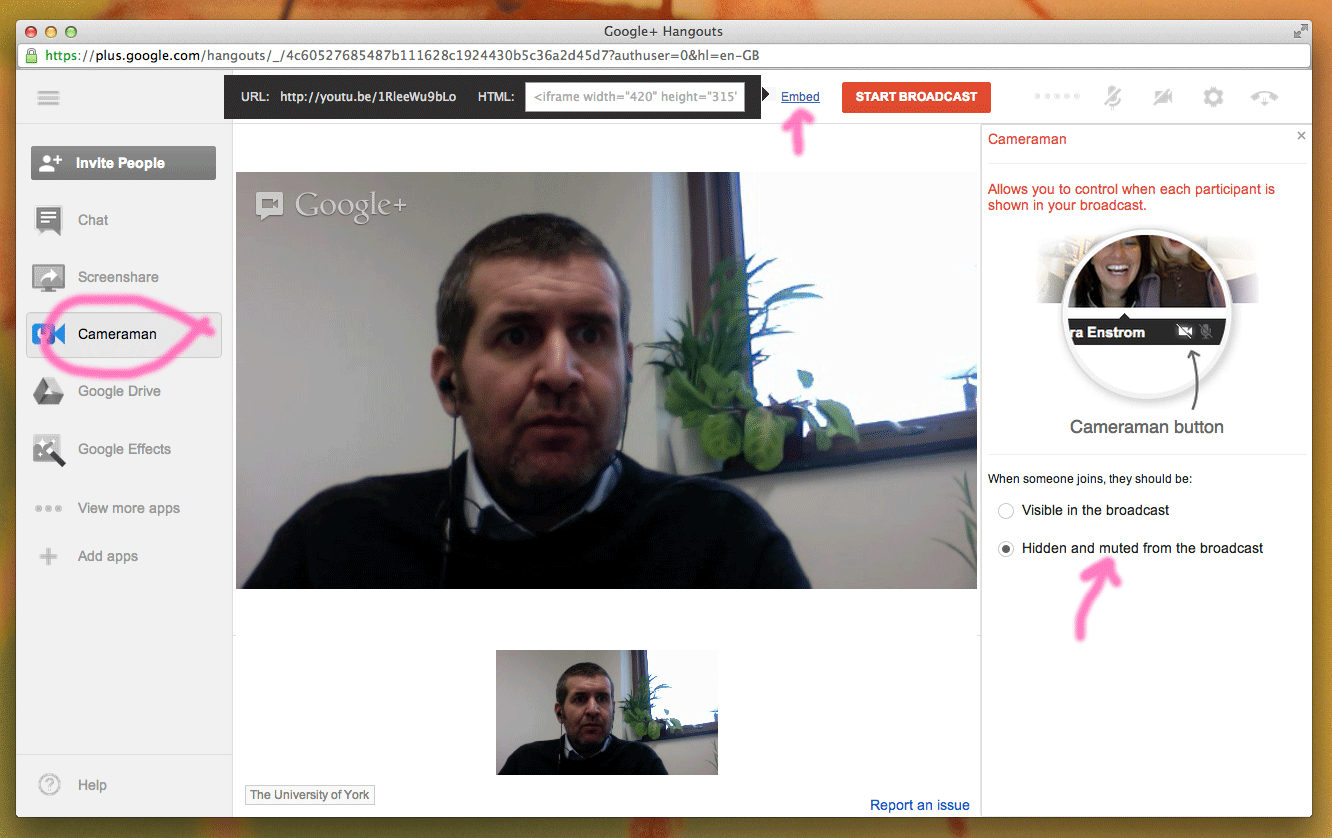
1. Start a Hangout ( check the On Air checkbox). You can do this from Google+, YouTube or even this link.
2. Choose your mic and camera settings (especially if you are using an additional webcam ).
3. Click Embed and copy the You Tube link ( see below )
4. Go to that YouTube link ( you can preview your stream ) other people will get a Broadcasting soon screen.
5. Share that link on Google+ or Twitter or via email ( if you want to ).
6. Important! Click Cameraman and set When someone joins, they should be: Hidden and muted From broadcast. This means you are in broadcast mode, rather than "massive meeting" mode where people can speak ( see below) .
7. Start your broadcast.


The End Result

We've found that the microphone on the laptop is more than adequate and the webcam is essential to easily framing the speaker. 

One week, the network dropping out meant that we had to use a uStream account to capture most of the seminar. This one disaster aside, it's been a complete success with academics joining in the Hangouts on a regular basis. 

We've created a Google Site to collect together the Seminar Hangouts here...  https://sites.google.com/a/york.ac.uk/yohrs/sharon-macdonald ... where we also add any presentation files.

Here's Sharon MacDonald giving the first Heritage Seminar of 2012-2013. 


The benefits of using Google Hangouts for quick collaborative video meetings or for public “on air” broadcasts are clear:

  • Everyone at York can participate, the don't need to download special apps, or register on various sites, they already have a log in. It works right now
  • The screen sharing tools work very well with your Google Apps. Think about using Google Slides rather than Powerpoint.
  • If your laptop has a camera, and even netbooks do nowadays, you don’t even need to buy a webcam ( we only did so for aesthetic reasons ).
  • Storage is huge.
  • And as with all our Google tools, it’s free

Using Google Spreadsheets to Record Chemistry Experiment Marks

Each year, around 200 chemistry students perform 20 Lab Experiments ( that’s roughly 4,000 a year ). Each test has a variety of marks to be kept by at least three people, the lab technician ( did they attend?), the tutor ( did they create the right chemistry and hand in their notes?) and the course leader ( are there any exceptions or mitigating circumstances etc).

What was previously a paper-based method had recently been made to work in our VLE, but the data captured was in a cumbersome wiki text format. And whilst the user interface was simple enough, the technology was struggling and getting the data collected from the VLE into our marks database required considerable human effort.

Working with David Pugh in Chemistry, we looked at using a Google Spreadsheets to collect the experiment data instead. After a few prototypes we have decided to use a very simple ( but quite wide ) spreadsheet to store the data and a web application “front end” for the markers to enter their marks.  I have worked with David, consulting about his requirements and have created him some Apps Script code. David is now editing the code, learning all about Apps Script and fine-tuning it to his needs. The ability to share small IT projects “in the cloud” using Apps Script is really empowering, for both David and I.

Whilst this project may at first glance seem a shade niche, but I often come across similar situations where technology has evolved and grown in the cracks between bigger systems.  The two systems here might be said to be “teaching” and the marks database ( SITS ).

It’s usually the case that these situations that the process ( or technology) requires a lot of upkeep and human input and that they don’t easily offer up accidental benefits, or usage that wasn’t envisaged when the original project was started. Now that we are taking control of our data in the “in between” stage, everyone is starting to see further possibilities of where this project might go next.

Implementation

After creating a prototype with the UI Builder, we decided that maybe a web application would be the best way forward. Both David and I are comfortable with simple HTML and we had an idea that we might need to use some of the excellent UI features of jQuery at some point.


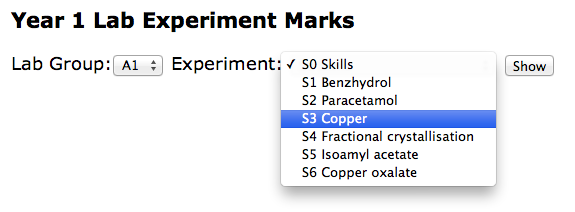
Our web application had a very simple collection of screens, the Home Page (shown above) which leads onto a listing of students (not shown), each linked to a form with which markers could add the relevant student marks ( shown below ).


All the data is stored in a ridiculously simple spreadsheet. This was David's idea and significantly improved on my original design just because it essentially has one row per student, which hopefully will make later reporting or visualisation needs a breeze.


Specific tips/code/ideas that you can reuse


Keeping Your Code Tidy with a Single CSS file

In an attempt to keep our application tidy, we added this function and a file called css.html. The css.html file actually contains its own <style> tag.

function getCSS(){
 var template = HtmlService.createTemplateFromFile('css.html');
 return template.getRawContent()
}

What this means is that our four or five templates all begin with code like this and we only have one CSS file shared between them all. The jquery libraries were commented out but ready to be added back in should we need them. This made our templates cleaner and much easier to maintain.

<head>
<link type="text/css" href="http://ajax.googleapis.com/ajax/libs/jqueryui/1.8.23/themes/smoothness/jquery-ui.css" rel="Stylesheet" />
   <!--script type="text/javascript" src="http://code.jquery.com/jquery-1.7.2.min.js"></script-->
   <!--script type="text/javascript" src="http://code.jquery.com/ui/1.8.23/jquery-ui.min.js"></script-->
   <?!= getCSS() ?>
 </head>

Note the ! in the <?!= getCSS()?> It’s easy to miss. The exclamation means actually display the code contained and don’t escape it. 


Using Script Properties to store Spreadsheet IDs


We also found that adding a spreadsheet id to the Script Properties made it easier to maintain our code, with it appearing only in one place, rather than being repeatedly repeated.

function get_ss_id() {
 // Gets a spreadsheet ID for this project from File > Project properties.
 // See: https://developers.google.com/apps-script/class_scriptproperties#setProperty
 return ScriptProperties.getProperty('spreadsheet_id');
}

We can then use a line like this, rather than adding the spreadsheet id each time.

var ss = SpreadsheetApp.openById( get_ss_id() )


General and Probably Obvious Tips


It quickly became clear that we should keep spreadsheet code and web application code in separate files. We didn’t realise that, because of security reasons that I don't really understand, Apps Script can’t REDIRECT a HTTP request, which is an unusual limitation. 

Also, because you also don’t have any control over your application’s URLs we found that our doGet() function behaves a little like a controller in an MVC sense and so keeping that code free of functions that work with the data ( the model ) made it much easier to read and maintain.

Always write tests! Almost every function we wrote has a test function created for it just to check that it is working properly. This makes the use of the debugger and logger much more productive.


Rolling Your Own Security

I was quite surprised by the “all or nothing” security model with Googe Web Apps which seems a bit poor.  Unlike Google Apps where you can set the permission levels, adding people and groups, with Google Web Apps you can only choose ( Everyone, Everyone at York or Just Myself ) which seems a bit limited.

It was easy to create some code like that shown below but I was surprised that access controls to the web application couldn’t be set up in the familiar Sharing dialog.

function get_supervisors_emails(){
 
 var ss = SpreadsheetApp.openById('OUR_SUPERVISORS_SPREADSHEET_ID')
 var sheet = ss.getSheetByName("Supervisors");
 var values = sheet.getDataRange().getValues();
 supervisors = []
 for(i = 1; i < values.length ; i++){
   supervisor = values[i]
   email = supervisor[7]
   supervisors.push(email)
   
 }
 return supervisors
}


var user = Session.getUser( );
var email = user.getEmail( );
var supervisors = get_supervisors_emails()
 
 // Noddy security
 if ( supervisors.indexOf(email) == -1 ){
       var template = HtmlService.createTemplateFromFile('NotSupervisorError.html');
       // This is used by the "<?= action ?> tag in the template
       template.action = ScriptApp.getService().getUrl( );
       template.email = email
       return template.evaluate();
 }


Conclusions


The project is now at the point where David is learning how it works, asking questions and making changes. Like me, David isn’t a programmer but is comfortable with simple HTML and Javascript. The current stage will be all about making the application work as easily as possible for the markers but David already has his eye on the next developments.

For example, the department needs to gather attendance data for immigration compliance, they will be able to show a marker’s average mark, they will be able to show students “falling behind” and integrate all of this into a “Lab Experiments Dashboard” showing key data items as visualisations. Watch this space for these developments.

Looking back, maybe we should have used Fusion Tables instead of Google Spreadsheets because our spreadsheet has grown quite large. I don’t think we will bump up against the cell limits that Google Spreadsheets have but we may have a use for the SQL-like means of querying our data.

The key benefit of this project will be about a department taking control over their data and complex processes and making them less arduous. Less time will be spent moving data from one area to another, there will be fewer human errors, and the data collected will be more “audit-friendly” since we log who edits it. But the part of the story I find most interesting is the new opportunities to better understand their own data, and ultimately to provide a better service to students.


© 2013 Klick Dev. All rights resevered.

Back To Top