Wednesday, April 30, 2014

How to fix incorrect username/password error for gmail on Apple mail ?

How to fix incorrect username/password error for gmail on Apple mail ?
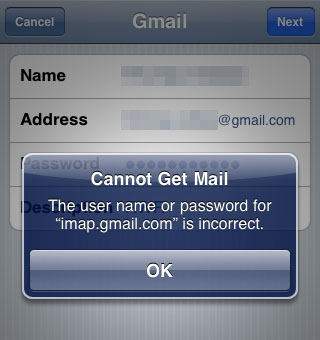
Ever wondered why Apple's mail show's incorrect password error for your gmail account even though you typed it correct? While users can access gmail from gmail app it's good to have all email services show up in a single app. In this post I will explain how to fix the incorrect username/password error for gmail on apple mail. This error is caused for gmail users who have opted for 2 step verification. The fix is to use a unique password for apple mail since it doesn't use 2 step verification.
Note: This fix works only if you have opted for Google's 2-step verification.


Steps to fix gmail error on apple mail 

  1. Go to Google account settings.  
  2. Switch to the security tab. 
  3. Under Password section, click settings displayed next to 2-step verification. 
    How to fix incorrect username/password error for gmail on Apple mail ?
  4. Re-enter your password if it prompts. 
  5. Now switch to App-specific passwords tab and click on manage application-specific passwords. 
    How to fix incorrect username/password error for gmail on Apple mail ?
  6. Re-enter password if it prompts. 
  7. Type a name in the box and hit generate password. 
    How to fix incorrect username/password error for gmail on Apple mail ?
  8. A computer generated password appears on the screen for one time use with the app. 
  9. Go to settings in your apple device. 
  10. Tap on Mail,Contacts and Calendars. 
  11. Under Accounts tap on Gmail. 
    How to fix incorrect username/password error for gmail on Apple mail ?
  12. Tap on your account and enter the unique password in the password field. 
    How to fix incorrect username/password error for gmail on Apple mail ?
  13. Tap done.
This demo has been shown on an Apple iPod touch running ios 7.1. If you haven't upgraded your ios to 7.1 then check out these reasons why you should do update to ios 7.1.


Sunday, April 27, 2014

Visual Basic .NET Tutorial 53 -How to import excel file to datagridview ...


Public Class Form1


Private Sub Button1_Click(ByVal sender As System.Object, ByVal e As System.EventArgs) Handles Button1.Click

Try

Dim MyConnection As System.Data.OleDb.OleDbConnection
Dim dataSet As System.Data.DataSet
Dim MyCommand As System.Data.OleDb.OleDbDataAdapter
Dim path As String = "C:\\Users\\dwishika\\Desktop\\vids\\excel\\Book1.xlsx"

MyConnection = New System.Data.OleDb.OleDbConnection("Provider=Microsoft.ACE.OLEDB.12.0;Data Source=" + path + ";Extended Properties=Excel 12.0;")
MyCommand = New System.Data.OleDb.OleDbDataAdapter("select * from [Sheet1$]", MyConnection)

dataSet = New System.Data.DataSet
MyCommand.Fill(dataSet)
DataGridView1.DataSource = dataSet.Tables(0)

MyConnection.Close()
Catch ex As Exception
MsgBox(ex.Message.ToString)
End Try

End Sub
End Class


---------------------------------------

Importing Any Excel Spreadsheet into a DataGridView - C#
VB.NET - Importing Excel File to dataGridView
import Excel File to VB.NET.net DataGridView
Import Excel To DatagridView
Import Data from Excel to DataGridView in VB.NET
import from excel to datagridview
VB.NET DataGridView Loading data from Excel
importing excel file into datagridview  How to get data from excel sheet to datagridview in VB.NET importing RowName and ColumnName from an excelfile posts
Import Excel file to DataGridView‎ VB.NET
Saving DataGrid View to Excel and opening Excel to
How to import data from Excel to Datagrid‎
How to Export Datagridview contents to Excel - VB.NET

Visual Basic .NET Tutorial 52 - How to Display Google Maps in VB.NET


Imports System.Text
Public Class Form1

Private Sub Button1_Click(ByVal sender As System.Object, ByVal e As System.EventArgs) Handles Button1.Click
Dim street As String = TextBox_street.Text
Dim city As String = TextBox_city.Text
Dim state As String = TextBox_state.Text
Dim zip As String = TextBox_zip.Text

Try
Dim queryAddress As New StringBuilder
queryAddress.Append("http://maps.google.com/maps?q=")

If TextBox_street.Text <> String.Empty Then
queryAddress.Append(street + "," & "+")
End If
If TextBox_city.Text <> String.Empty Then
queryAddress.Append(city + "," & "+")
End If
If TextBox_state.Text <> String.Empty Then
queryAddress.Append(state + "," & "+")
End If
If TextBox_zip.Text <> String.Empty Then
queryAddress.Append(zip + "," & "+")
End If

WebBrowser1.Navigate(queryAddress.ToString)

Catch ex As Exception
MessageBox.Show("Unable to retrive date")
End Try

End Sub
End Class


---------------------------------------------------------------

Show Your Data on Google Map using VB.NET
How to add google maps in a VB.NET  Program
VB.NET  - how to display address in google map
Display Google Map in Windows Form - VB.NET  / C Sharp
display google maps in VB.NET  application
VB.NET  And Google Maps - VB.NET
Integrating Google Maps with VB.NET
Embed Google Maps in VB.NET
how to show locations in a Google map
Google Maps in VB.NET  Web Application


© 2013 Klick Dev. All rights resevered.

Back To Top