Showing posts with label spreadsheets.. Show all posts

Monday, June 24, 2013

When Do You Have Your Weekly Team Meetings?

I met with a department recently and they'd made a spreadsheet where they could tell each other when their preferred time to have a weekly meeting would be. When you have lots of people working different hours as they do, it's difficult to choose a single time that doesn't always exclude someone.

They created a sheet for everyone that looks like this.... You can see how complex things can be schedule-wise for just one person.


The problem was that when they tried to calculate when the best time to meet would be, they got this...


...and discovered that there's never a good time to have a Team Meeting - except for Friday breakfast and over lunch on Tuesday.

I think the problem may have been our inability to imagine how to go about solving the problem, mine especially. Using lots of embedded arcane formulas in spreadsheets has always worried me. I imagine this is simple for a spreadsheet expert. 

What we needed to was work out all the available times ( making them numerical rather than "IF-NEED-BE" ) and then rank those times based on percentages of all the times. This ( below ) took a few lines in Apps Script.


And we discovered that the BEST time to have a weekly meeting, based on the data collected, was Friday at 4PM.

... crazy eh?

Wednesday, January 30, 2013

Using Google Spreadsheets to Record Chemistry Experiment Marks

Each year, around 200 chemistry students perform 20 Lab Experiments ( that’s roughly 4,000 a year ). Each test has a variety of marks to be kept by at least three people, the lab technician ( did they attend?), the tutor ( did they create the right chemistry and hand in their notes?) and the course leader ( are there any exceptions or mitigating circumstances etc).

What was previously a paper-based method had recently been made to work in our VLE, but the data captured was in a cumbersome wiki text format. And whilst the user interface was simple enough, the technology was struggling and getting the data collected from the VLE into our marks database required considerable human effort.

Working with David Pugh in Chemistry, we looked at using a Google Spreadsheets to collect the experiment data instead. After a few prototypes we have decided to use a very simple ( but quite wide ) spreadsheet to store the data and a web application “front end” for the markers to enter their marks.  I have worked with David, consulting about his requirements and have created him some Apps Script code. David is now editing the code, learning all about Apps Script and fine-tuning it to his needs. The ability to share small IT projects “in the cloud” using Apps Script is really empowering, for both David and I.

Whilst this project may at first glance seem a shade niche, but I often come across similar situations where technology has evolved and grown in the cracks between bigger systems.  The two systems here might be said to be “teaching” and the marks database ( SITS ).

It’s usually the case that these situations that the process ( or technology) requires a lot of upkeep and human input and that they don’t easily offer up accidental benefits, or usage that wasn’t envisaged when the original project was started. Now that we are taking control of our data in the “in between” stage, everyone is starting to see further possibilities of where this project might go next.

Implementation

After creating a prototype with the UI Builder, we decided that maybe a web application would be the best way forward. Both David and I are comfortable with simple HTML and we had an idea that we might need to use some of the excellent UI features of jQuery at some point.


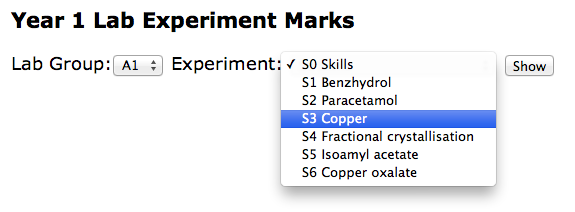
Our web application had a very simple collection of screens, the Home Page (shown above) which leads onto a listing of students (not shown), each linked to a form with which markers could add the relevant student marks ( shown below ).


All the data is stored in a ridiculously simple spreadsheet. This was David's idea and significantly improved on my original design just because it essentially has one row per student, which hopefully will make later reporting or visualisation needs a breeze.


Specific tips/code/ideas that you can reuse


Keeping Your Code Tidy with a Single CSS file

In an attempt to keep our application tidy, we added this function and a file called css.html. The css.html file actually contains its own <style> tag.

function getCSS(){
 var template = HtmlService.createTemplateFromFile('css.html');
 return template.getRawContent()
}

What this means is that our four or five templates all begin with code like this and we only have one CSS file shared between them all. The jquery libraries were commented out but ready to be added back in should we need them. This made our templates cleaner and much easier to maintain.

<head>
<link type="text/css" href="http://ajax.googleapis.com/ajax/libs/jqueryui/1.8.23/themes/smoothness/jquery-ui.css" rel="Stylesheet" />
   <!--script type="text/javascript" src="http://code.jquery.com/jquery-1.7.2.min.js"></script-->
   <!--script type="text/javascript" src="http://code.jquery.com/ui/1.8.23/jquery-ui.min.js"></script-->
   <?!= getCSS() ?>
 </head>

Note the ! in the <?!= getCSS()?> It’s easy to miss. The exclamation means actually display the code contained and don’t escape it. 


Using Script Properties to store Spreadsheet IDs


We also found that adding a spreadsheet id to the Script Properties made it easier to maintain our code, with it appearing only in one place, rather than being repeatedly repeated.

function get_ss_id() {
 // Gets a spreadsheet ID for this project from File > Project properties.
 // See: https://developers.google.com/apps-script/class_scriptproperties#setProperty
 return ScriptProperties.getProperty('spreadsheet_id');
}

We can then use a line like this, rather than adding the spreadsheet id each time.

var ss = SpreadsheetApp.openById( get_ss_id() )


General and Probably Obvious Tips


It quickly became clear that we should keep spreadsheet code and web application code in separate files. We didn’t realise that, because of security reasons that I don't really understand, Apps Script can’t REDIRECT a HTTP request, which is an unusual limitation. 

Also, because you also don’t have any control over your application’s URLs we found that our doGet() function behaves a little like a controller in an MVC sense and so keeping that code free of functions that work with the data ( the model ) made it much easier to read and maintain.

Always write tests! Almost every function we wrote has a test function created for it just to check that it is working properly. This makes the use of the debugger and logger much more productive.


Rolling Your Own Security

I was quite surprised by the “all or nothing” security model with Googe Web Apps which seems a bit poor.  Unlike Google Apps where you can set the permission levels, adding people and groups, with Google Web Apps you can only choose ( Everyone, Everyone at York or Just Myself ) which seems a bit limited.

It was easy to create some code like that shown below but I was surprised that access controls to the web application couldn’t be set up in the familiar Sharing dialog.

function get_supervisors_emails(){
 
 var ss = SpreadsheetApp.openById('OUR_SUPERVISORS_SPREADSHEET_ID')
 var sheet = ss.getSheetByName("Supervisors");
 var values = sheet.getDataRange().getValues();
 supervisors = []
 for(i = 1; i < values.length ; i++){
   supervisor = values[i]
   email = supervisor[7]
   supervisors.push(email)
   
 }
 return supervisors
}


var user = Session.getUser( );
var email = user.getEmail( );
var supervisors = get_supervisors_emails()
 
 // Noddy security
 if ( supervisors.indexOf(email) == -1 ){
       var template = HtmlService.createTemplateFromFile('NotSupervisorError.html');
       // This is used by the "<?= action ?> tag in the template
       template.action = ScriptApp.getService().getUrl( );
       template.email = email
       return template.evaluate();
 }


Conclusions


The project is now at the point where David is learning how it works, asking questions and making changes. Like me, David isn’t a programmer but is comfortable with simple HTML and Javascript. The current stage will be all about making the application work as easily as possible for the markers but David already has his eye on the next developments.

For example, the department needs to gather attendance data for immigration compliance, they will be able to show a marker’s average mark, they will be able to show students “falling behind” and integrate all of this into a “Lab Experiments Dashboard” showing key data items as visualisations. Watch this space for these developments.

Looking back, maybe we should have used Fusion Tables instead of Google Spreadsheets because our spreadsheet has grown quite large. I don’t think we will bump up against the cell limits that Google Spreadsheets have but we may have a use for the SQL-like means of querying our data.

The key benefit of this project will be about a department taking control over their data and complex processes and making them less arduous. Less time will be spent moving data from one area to another, there will be fewer human errors, and the data collected will be more “audit-friendly” since we log who edits it. But the part of the story I find most interesting is the new opportunities to better understand their own data, and ultimately to provide a better service to students.


Tuesday, September 25, 2012

6. Booking System and Permissions (Update)


  • The original idea was to use a calendar for hot desk ( or perches as they're called ) bookings, that students could add their bookings to.
  • The idea was to use a spreadsheet, to essentially show which hot desks ( or perches ) which were already booked.
  • The idea was for the script to add an event to the booking calendar, and add the student to the event as a guest.


All of these lovely ideas would mean that there was one central calendar that admin people could check, that people could add their own bookings and also receive something in their calendar so they wouldn't to forget to show up.

Except, none of this works...

... or rather, because I was cornered into creating a Booking Task Queue sheet because adding events didn't work reliably I therefore ran the event adding code from a Trigger ( once a minute ) rather than as  it happens. This of course means that the script runs as ME ... the script author and not THE STUDENT ... who is using the booking system.

What this then means is that when the student makes a booking, they need to agree via a big ugly authentications dialog that they agree to have ME tinkering on their behalf.

What all this means is that if I use a central calendar I would need to add the student to a Google Group and make that Google Group able to manage all events on that calendar in order to add stuff to that calendar UNLESS I revert back to using a triggered script.

Are you still with me?

It would seem that I need to have TWO separate ways of adding events ( one via a trigger and the other when the student makes a booking) and work with calendars independently ).

That is to say, when a student makes a hot desk booking...

  • An event is added to the students' calendar using... CalendarApp.getDefaultCalendar()
  • An event is added to a task queue which will ultimately use ... CalendarApp.getCalendarById('YOUR_CAL_ID@group.calendar.google.com'); 

This means that as well as having a spreadsheet, that is effectively uncoupled from the calendar which it represents, I also have a central calendar that is completely uncoupled from each an every students' calendar. This means that were I to delete a booking in the central calendar, then the student would not be informed that this had happened.

Does this even matter?

I knew when I started using a spreadsheet as a pseudo-calendar, that it might be a bit of work to "sync" either what was in the calendar with what was in the spreadsheet and vice versa, but I'm now in the position of not actually needing a central calendar, I mean, what's the point of it exactly? I guess the answer to that is different presentation views ( week, day, agenda etc ).

But this get's less useful the more bookings there are ( which was the original need to even begin this project ) because as soon as you have 30 or so booking on one day, the calendar interface starts becoming useless, it's just too jumbled.

So the spreadsheet should become the golden master really.... there shouldn't be a central calendar and maybe that will clear up any permissions issues ( it will at least remove some of the icky corners of the code ) along the way.

Uh oh!

There are now some oddities with regards Google Drive and Google Groups. I think I'll save those for another post... maybe later.


Saturday, May 5, 2012

Building an App at the University of York

A funny thing happened to me on the way to the Collaborative Tools Project this week. Someone had dropped in for a chat and I was enthusing about the creative possibilities offered by both Google App Engine and Google App Script for people "doing it for themselves" and they asked...

"But does anyone actually want to DO this?"

He had a point. To be honest, I don't know. I can't know, but I'm pretty sure I think I know that they do. And then within the week I came across someone at the University using Android tablets for data entry into spreadsheets, where data get moved between sheets based on a workflow and is all presented using lovely looking visualisations. People not only wanted to be doing this stuff - they were already doing it.

Google AppScript

So. I said I'd let you know how I was getting on with Google AppScript ( long video here if you want to get started yourself ).

The short answer is quite well. Given that I have a deep seated hatred of braces and semi-colons in programming languages and AppScript is all Javascript-based, I'm not doing bad at all.

The long answer is that I have created a Rock n Roll interface that looks like this...


The bit I am pleased about is that the top bit was created in AppScripts GUI builder and the bands were added programmatically from a spreadsheet. What's good about this is that it would mean that our designers could theme applications and programmers could do the other bits.

Another rather wonderful thing is that the app is hosted...

https://docs.google.com/a/macros/york.ac.uk/exec?service=AKfycbz2tlS0aVGB7y--qtcuEQ-uTDqRezc7pZp_ZmwjiQ

... I know it's not big or clever. But it's available for you to use now. I didn't have to ask anyone to make it available. I've made it available to "Anyone at York" but equally, it might be available to a small project group or department.

That's TWO BIG THINGS... It's there... ready to use ... AND it handles permissions. It's worth pointing out simply because think about what the alternative would have to be, to have an application available to use for University of York staff staff within the afternoon, based on a crazy idea you had in the morning. Tell me how that would happen without AppScript.

The Second Cool Thing

Is that, based on the spreadsheet data, a Google Site's pages were populated/published. If you click the links on the apps above you'll see what I mean. It ain't pretty, but it's a start. It means people could potentially comment on any of the bands I've added... or upload files or just access some of the data.

Conclusion

I know what I've made is ugly as sin, and doesn't do much but it's a very encouraging start. Having trialled Google App Engine which I think wouldn't be suitable for "citizen development"... Google AppScript definitely is ideal for small widget-like apps, or quick wizards or simple applications.

You wouldn't want to write Facebook in Google AppScript but those handy dandy applications that make your life more sensible are definitely doable. The only hard part is thinking up the idea.


© 2013 Klick Dev. All rights resevered.

Back To Top