Showing posts with label Appscript. Show all posts

Wednesday, October 29, 2014

One-To-Many Relationship in a Google Spreadsheet

It's often the case that you want and need to be creating a database to store your data, but Google Spreadsheets are just so handy aren't they? But Google Spreadsheets are very good at relational data.

Here's an example where, you want to have one column for the name of your recipe and another for the ingredients ( comma separated ).

How you use this script is you click on the cell you want to be relational and choose the Admin > Show Relationship Editor. This opens up a dialog window showing you all the options included so far. You then alter the ingredients and it saves a comma separated list into the spreadsheet.


Here's the spreadsheet. Use File > Make a copy to see it work and rummage around in the code.

If anyone can help make the UI prettier I'd be grateful, thanks.

Creating a Documentation Process With Google Forms, Documents and Spreadsheets.

We wanted to improve the way people at the University request new software and tools. This is a process that requires lots of people's feedback and needs to be very flexible. We need to get software experts to look at it, security teams, the support teams, teaching experts to see if is a good pedagogical match. We need the licensing to looked at and the usability and accessibility. The list is astonishingly long and in these cases it often gets so that your process map just starts to look like infinite spaghetti. No wonder it didn't quite work, infinite spaghetti is always troublesome.

Much of my work involves trying to find a workable solution to a fiendish problem.. it's simplicity hunting. And when working with people around the university it's clear that they really don't want a tool that solves their immediate problem, they want abilities that solve problems like these. This is a very different thing. And besides I personally couldn't create

So, out of necessity I created (an as yet, unfinished ) Apps Script code library, to try and make doing jobs like the one above simpler. The point of this library is not to do anything fancy or specific but just to do those things that frankly Google should have rolled in as features anyway so that new coders could easily just wire their app together with a whole heap less complication.

The code library is called Handy Lumps because that's just what it is. Handy Lumps of code that you can re-use again and again. I won't tell you how to install Handy Lumps library into your code, but you can find that out easily enough. The project id is...

1ykOx87hMWudgdOl3i9XND-zeV8WEieBjVwxcPYG_2iDvX5kd70KpbfIl

So What Does This Example Do, Tom?

In this example, someone fills in a Google Form to request some new software. What it then does is take that information and render it into a Google Document template file, and put it into a folder. Lastly, it saves the URL to the new file in the spreadsheet. It's amazing how many use cases look a bit like this.

It's also amazing how many processes start by looking like something mappable, something with a clear structure but actually are closer to an iterative collaboration. For example, the template that gets created has further questions in, which can of course be added to and bent into the shape that is required. And of course using Google Document +commenting feature you can easily bring someone new into the discussion for their advice and help.


So How Does This Example Work, Tom?

Let's look at the code. First I created a Form and then went to Spreadsheet and chose the Tools > Script Editor menu and added this. I'll explain what it does below.


function onFormSubmit(e) {

  //Get the values in a nice Array
  var values = HandyLumps.row_to_dict(e.range)
  var template_id = "TEMPLATE_DOCUMENT_ID"
  var folder_id = "FOLDER_ID" // Our Responses folder.
  var name = values['Name'] + " - " + values['What software are you requesting?']


  // Create a Google Doc
  var new_file_id = HandyLumps.copy_and_render_to(template_id, name, values, folder_id)
  var new_file = DriveApp.getFileById(new_file_id)
  var url = new_file.getUrl() 

  //Update the spreadsheet with a link to the new file
  var ss = SpreadsheetApp.openById("THIS_SPREADSHEET_ID")
  var sheet = ss.getSheetByName("Form responses 1")//this sheet
  var row = e.range.getRow()
  sheet.getRange(row, 16 ).setValue(url)
 

  MailApp.sendEmail("YOUR-GOOGLE-GROUP-HERE@york.ac.uk", "New Software Request: " + values['What software are you requesting?'], url, {noReply:true})

}

The first thing the script does is turn the row of data into a nice array. This returns an array that looks like this {'timestamp':2014/29/10 10:55:45, 'name': Tom ...etc} It builds this array based on your header names ( and yes, it assumes they are unique for simplicity ) . Doing this avoids the issues with e.namedValues containing multiple items and gives me a simple array I can use later.

Next we tell the script the ids of the template document and into which folder we want the new documents to go.

We then create a new document from a template file. The template file has {timestamp} and {name} tags in which match my spreadsheet headers and get replaced with the values. To do this we use ...

HandyLumps.copy_and_render_to() 

This function returns the id of the new document created, so we then open it with DriveApp and get its URL. ( I did think about returning the File object, but often that's not what I needed anyway so decided on the simplest thing ).

I then use regular Apps Script to save that URL into the same row.

The last line mails a Google Group to let them know a new request has come in.

Ta Da!

There you have it. We've made quite a cute thing in a paragraph of non-scary code copy-and-pastee-style.

I'm all for the current trend to believe that "we all can be coders now" but I also think that the tools themselves could be made a damn sight easier to use before we welcome those brave souls willing to give it try.


Next Steps


More involved versions of the above code create a Google Doc from a template that has code in it, so that new document can show a sidebar ( for example to approve it, or give it a mark out of ten ) that let's someone move the document onto the next step. The data from the sidebar is of course saved into the right row using Handy Lumps functions like this...

HandyLumps.get_row_containing(ss_id,sheet_name, column_letter, match)


In the example above, a document's script might contain...

var doc = DocumentApp.getActiveDocument()
var doc_id = doc.getId()
var result = HandyLumps.get_row_containing("YOUR_SHEET_ID","SHEET_NAME", "M", doc_id)
var row = result[0]
var values =result[1]


... which essentially means that a document knows where to store its new data. And using cute things like Google Document's Named Ranges you can make a sidebar that stores people's textual contributions back into the original spreadsheet. I'll hopefully get to sharing that stuff later.


Friday, February 1, 2013

Using Google Spreadsheets To Improve Student Accommodation


The Problem

Tim Saunders, is fast becoming the poster boy for my belief that getting non-technical people coding is good idea.

Tim started in the University of York accommodation office and inherited a task of managing students' requests to change their room.

This room changing process was paper-based and requires various peoples' agreement and signatures. It resulted in a student having to carry an increasingly dog-eared form to college administrators and back to Tim and then to the old college administrators. It was slow, actively encouraged signature forging and reliably error prone.

All the data collected then needed to be entered into SITS, our student database, which involves various charging and set up costs, so it really helps if this data is correct, having being verified by everyone in the chain.


The Solution

Armed with a some self-taught Javascript using the online learning platform CodeAcademy, Tim thought that the pile of paper forms in his office and queue of frustrated students could be improved with some Google applications.

He used a combination of tools to help manage the flow of information, including Google Forms, Spreadsheets and Apps Script to automatically send emails to college administrators and students.

The (massively simplified version of the ) process begins with a student filling out a Request to Transfer form ( shown below ).


The data collected from the form is added to spreadsheet (shown below) that has extra data integrated with it about the rooms features and contract details. An email is sent to the current college administrator that they can then approve or deny and then, once approved it is then sent to the prospective college administrator to confirm availability.


In the spreadsheet above you can see notes on when to "Check CA ( College Administrator ) and tools to fire off a particular email. The colouring of the spreadsheet is done automatically to help with navigating and understanding what the overall status of accommodation requests is.

Once agreed, students then receive an email in which an additional form is used to confirm their order. ( shown below ).


Once everything is agreed and confirmed, the data needed is sent to Tim in a format that means he doesn't have to enter it manually into our student database, SITS. A poor man's API if you will and still massively better than entering names, numbers and data by hand!


Interestingly, Tim and the Accommodation can now also for the first time, see the whole process from a bird's eye view by using the charting tools in the spreadsheet to see, from which college the most requests are being received, and when the most requests come in ( the start of term ).


One thing that I really like about Tim's implementation in this project is its lightweight approach. They didn't sit back and design a whole complicated web application that ultimately wouldn't have fit the many edge cases and workarounds in these sorts of scenarios. I like how the system primarily uses email, something College Administrators are comfortable with, and more importantly, remember to do.

Now that Tim has been promoted, the next real challenge for Accommodation ( and Tim ) is to find the best way to ensure that all this work is usable and maintainable by the Accommodation team. I know they're doing all they can to make sure that it is well documented and as collaboration-friendly as possible. They're even considering screencasts to help explain how the pieces fit together.


Tim Saunders, (like Paul Bushell in Estates with his Dashboard system ) has shown that anyone who wants to can take control of both messy processes and code to make life better, not just for themselves ( even though that would be justification enough ) but for students and colleague too. What was a slow, arduous, error prone process is now elegantly handled in a few Google Spreadsheets and Google Forms.


Wednesday, January 30, 2013

Using Google Spreadsheets to Record Chemistry Experiment Marks

Each year, around 200 chemistry students perform 20 Lab Experiments ( that’s roughly 4,000 a year ). Each test has a variety of marks to be kept by at least three people, the lab technician ( did they attend?), the tutor ( did they create the right chemistry and hand in their notes?) and the course leader ( are there any exceptions or mitigating circumstances etc).

What was previously a paper-based method had recently been made to work in our VLE, but the data captured was in a cumbersome wiki text format. And whilst the user interface was simple enough, the technology was struggling and getting the data collected from the VLE into our marks database required considerable human effort.

Working with David Pugh in Chemistry, we looked at using a Google Spreadsheets to collect the experiment data instead. After a few prototypes we have decided to use a very simple ( but quite wide ) spreadsheet to store the data and a web application “front end” for the markers to enter their marks.  I have worked with David, consulting about his requirements and have created him some Apps Script code. David is now editing the code, learning all about Apps Script and fine-tuning it to his needs. The ability to share small IT projects “in the cloud” using Apps Script is really empowering, for both David and I.

Whilst this project may at first glance seem a shade niche, but I often come across similar situations where technology has evolved and grown in the cracks between bigger systems.  The two systems here might be said to be “teaching” and the marks database ( SITS ).

It’s usually the case that these situations that the process ( or technology) requires a lot of upkeep and human input and that they don’t easily offer up accidental benefits, or usage that wasn’t envisaged when the original project was started. Now that we are taking control of our data in the “in between” stage, everyone is starting to see further possibilities of where this project might go next.

Implementation

After creating a prototype with the UI Builder, we decided that maybe a web application would be the best way forward. Both David and I are comfortable with simple HTML and we had an idea that we might need to use some of the excellent UI features of jQuery at some point.


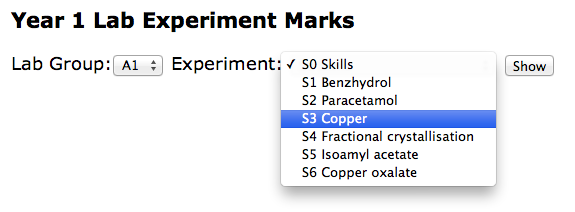
Our web application had a very simple collection of screens, the Home Page (shown above) which leads onto a listing of students (not shown), each linked to a form with which markers could add the relevant student marks ( shown below ).


All the data is stored in a ridiculously simple spreadsheet. This was David's idea and significantly improved on my original design just because it essentially has one row per student, which hopefully will make later reporting or visualisation needs a breeze.


Specific tips/code/ideas that you can reuse


Keeping Your Code Tidy with a Single CSS file

In an attempt to keep our application tidy, we added this function and a file called css.html. The css.html file actually contains its own <style> tag.

function getCSS(){
 var template = HtmlService.createTemplateFromFile('css.html');
 return template.getRawContent()
}

What this means is that our four or five templates all begin with code like this and we only have one CSS file shared between them all. The jquery libraries were commented out but ready to be added back in should we need them. This made our templates cleaner and much easier to maintain.

<head>
<link type="text/css" href="http://ajax.googleapis.com/ajax/libs/jqueryui/1.8.23/themes/smoothness/jquery-ui.css" rel="Stylesheet" />
   <!--script type="text/javascript" src="http://code.jquery.com/jquery-1.7.2.min.js"></script-->
   <!--script type="text/javascript" src="http://code.jquery.com/ui/1.8.23/jquery-ui.min.js"></script-->
   <?!= getCSS() ?>
 </head>

Note the ! in the <?!= getCSS()?> It’s easy to miss. The exclamation means actually display the code contained and don’t escape it. 


Using Script Properties to store Spreadsheet IDs


We also found that adding a spreadsheet id to the Script Properties made it easier to maintain our code, with it appearing only in one place, rather than being repeatedly repeated.

function get_ss_id() {
 // Gets a spreadsheet ID for this project from File > Project properties.
 // See: https://developers.google.com/apps-script/class_scriptproperties#setProperty
 return ScriptProperties.getProperty('spreadsheet_id');
}

We can then use a line like this, rather than adding the spreadsheet id each time.

var ss = SpreadsheetApp.openById( get_ss_id() )


General and Probably Obvious Tips


It quickly became clear that we should keep spreadsheet code and web application code in separate files. We didn’t realise that, because of security reasons that I don't really understand, Apps Script can’t REDIRECT a HTTP request, which is an unusual limitation. 

Also, because you also don’t have any control over your application’s URLs we found that our doGet() function behaves a little like a controller in an MVC sense and so keeping that code free of functions that work with the data ( the model ) made it much easier to read and maintain.

Always write tests! Almost every function we wrote has a test function created for it just to check that it is working properly. This makes the use of the debugger and logger much more productive.


Rolling Your Own Security

I was quite surprised by the “all or nothing” security model with Googe Web Apps which seems a bit poor.  Unlike Google Apps where you can set the permission levels, adding people and groups, with Google Web Apps you can only choose ( Everyone, Everyone at York or Just Myself ) which seems a bit limited.

It was easy to create some code like that shown below but I was surprised that access controls to the web application couldn’t be set up in the familiar Sharing dialog.

function get_supervisors_emails(){
 
 var ss = SpreadsheetApp.openById('OUR_SUPERVISORS_SPREADSHEET_ID')
 var sheet = ss.getSheetByName("Supervisors");
 var values = sheet.getDataRange().getValues();
 supervisors = []
 for(i = 1; i < values.length ; i++){
   supervisor = values[i]
   email = supervisor[7]
   supervisors.push(email)
   
 }
 return supervisors
}


var user = Session.getUser( );
var email = user.getEmail( );
var supervisors = get_supervisors_emails()
 
 // Noddy security
 if ( supervisors.indexOf(email) == -1 ){
       var template = HtmlService.createTemplateFromFile('NotSupervisorError.html');
       // This is used by the "<?= action ?> tag in the template
       template.action = ScriptApp.getService().getUrl( );
       template.email = email
       return template.evaluate();
 }


Conclusions


The project is now at the point where David is learning how it works, asking questions and making changes. Like me, David isn’t a programmer but is comfortable with simple HTML and Javascript. The current stage will be all about making the application work as easily as possible for the markers but David already has his eye on the next developments.

For example, the department needs to gather attendance data for immigration compliance, they will be able to show a marker’s average mark, they will be able to show students “falling behind” and integrate all of this into a “Lab Experiments Dashboard” showing key data items as visualisations. Watch this space for these developments.

Looking back, maybe we should have used Fusion Tables instead of Google Spreadsheets because our spreadsheet has grown quite large. I don’t think we will bump up against the cell limits that Google Spreadsheets have but we may have a use for the SQL-like means of querying our data.

The key benefit of this project will be about a department taking control over their data and complex processes and making them less arduous. Less time will be spent moving data from one area to another, there will be fewer human errors, and the data collected will be more “audit-friendly” since we log who edits it. But the part of the story I find most interesting is the new opportunities to better understand their own data, and ultimately to provide a better service to students.


Thursday, January 10, 2013

An Alternative To Google Calendar's Appointment Slots

You might not know but Google are dropping the Appointment Slots feature from Google Calendar. The academic community has been pretty miffed about this decision because it's one of the features they've really taken to their hearts and were actively using. Appointment Slots are a great way of making any number of tutorial slots available for tutorials and letting students pick which times suit them.

Google responded to the academic outcry with a list of alternatives. This list included paid for services with no clear pricing model for enterprise, downloadable open source software and, rather desperately, a few web2.0 tools that weren't even relevant. Few of these tools integrated with Google Calendars or Contacts, none would have worked with our log ins, and of course, none would be embedded in your Google Calendar making it easy to create overlapping or clashing appointments.

So, I wondered how useful a tool I could create using Apps Script. Of course I couldn't embed it Google Calendar but it could work with our York single sign-on, and add details to Google Calendar. The Apps Script environment is limited in many ways - making it difficult to create an elegant solution, but its integration abilities might make it "good enough" for booking tutorial slots.


The Demo


But before you get too excited. There are a few caveats about this version of Appointment Slots.  

The first caveat is that you shouldn't expect bug fixes. This is a proof-of-concept / stop gap project. 

The first screen you and your users will see are these.


These two hideous screens are there to warn you ( and your students ) that I have access to your Calendar ( to create and delete events ), to send email and other things. There's nothing I can do about these screens. In a better designed world, Google would design Apps Script so that I, as coder, maybe only had access to a sandboxed area, or calendars I made myself that you then subscribe to - which would prevent me doing anything nasty or stupid. 

Another caveat is that I can't embed this app in your Calendar. It's a separate application.

The last caveat is that it all sort of works backwards. What I mean by this is that when you, for example, create a Tutorials Appointment Slots, the times are blocked out in your calendar. When a student books one of the tutorial slots, I have to create the booking event in the student's calendar and invite you to it.  

This is a side-effect of Google's permissions model. Because a student can't directly add items to your calendar, they have to add items to their own. You can see what it looks like in your calendar below.


It's also a bit slow. 

Using The Demo


There are really only two screens. The Home screen, shown below, lets you create an Appointment Slot in any calendars you own. 


When you have created your Appointment Slots, you are shown a screen similar to the one below that has a "Share this URL" link in it, which you can send to students. You also receive an email with these details in so that you can create a number of Appointment Slots on different days and collect them into one email that you send to students.

The student would then see a screen like this one. They can click the "Book this slot" and an event is added to their Calendar - and an invite sent to the lecturer who made the Appointment Slots ( see what I mean about backwards? ).  


A student can release an appointment booking by clicking the release link. 

All the data for this application is stored in what's called a ScriptDB. I did look at updating the ScriptDB when a student deletes a booking from their Calendar. That may be a version 2.0 feature, if I have any more time for development.

Top Tip: Create a Separate Calendar Just for Appointments Before You Start

If you create a calendar just for Appointments, and then create your appointments in that calendar then there is a way for students to browse lots of different options. If you have made your calendar public you can then let people browse your calendar (go to January 10th 2013 ) like this. Students could then use the link in the event description ( yes, I know, I know ) to be able to book onto that particular day.


If you are happy with all of the above then to see the demo go here.


p.s Thanks to +Martin Hawksey for his help along the way.

Friday, October 5, 2012

The Day I Dropped Round The Security Guy's

After discovering that my direction of work for the Booking System was from a security perspective, deeply flawed, I thought that I could perhaps work around giving people access to the code by embedding a web application within a Google site. I thought this would be a big structural change, but it only took a few minutes. It looks like this.


There's a slightly different approach. Firstly the spreadsheet is embedded as view only. The spreadsheet is only used a visualisation of availability now - there's no direct manipulation of any data. 

Because, almost without thinking, I made the published web app a HTML based one, it meant that I could easily add jQuery and interface niceties like the date choosing dropdown (shown above).

Because all the code runs as me, and I've already authorized the code, the end user isn't presented with any awful dialogs. I make adding the booking something that the end user does, by hand themselves. You can pre-populate a Google Calendar new event form by hacking the url variables easily. Like this...


Conclusions?

Well, it's good to know that I have something that we can happily share around the university securely.

The disappointing aspects are that...

Google Spreadsheets don't seem to allow you separate the concepts of a "data editor" and a "code editor" in any useful way. That means, if you allow someone to add data, they can change the way that data gets added. The only way to "share" collaborative data is to cludge an awkward and ugly interface in the front of it. This means that, AppsScript is best used within a spreadsheet for individual ( or selected ) users... not in a collaborative scenario.

Whilst "jumping ship" into a HTML based web app, rather that using widgets in a Spreadsheet does add more complexity but also brings more control. I may end up not using the spreadsheet viewing gadget and build a table of bookings by scratch, one that can take direct manipulation to book multiple hot-desks across multiple days. I had wanted to leverage many of the spreadsheet's abilities, I now have to think of the spreadsheet as backend-data storage. I also have to grapple with jQuery to build a table as complex as a the spreadsheet shown above (with some cells coloured in). 

When working with the UI Builder, it isn't possible to have copy-and-pasteable UIs or share them amongst different spreadsheets. This makes for unmaintainable code, with each spreadsheet containing its own hand-crafted UI. Were UIs standalone objects, like AppsScripts are becoming, then they could at least be duplicated, or loaded and copied-n-pasted. 

Google's whole "Publish Your Apps Script" concept is flawed. Who would be daft enough to click the dialog that says, give this unknown author complete access to all my docs and emails? 

What All Of This Means

Over the last few months we've seen a lot of new developments from Google, many of them very welcome, but new developments are often very easy self-contained concepts... I would like to see a bit more depth and sophistication from Google in how the bits fit together, where the gaps are and where things could be smoother.

For example, the UI Builder components could include a date-picker surely? And what about type-ahead scrolling perhaps. And how about different classes for working with data, instead of SpreadsheetApp how about CodeAuthorSpreadsheetApp ( which can't read all the user's data  )? 

The feeling that I'm getting is that AppsScript ( and UI Builder widgets ) when used with spreadsheets is only useful for data that you own... and isn't appropriate for shared data... a web app front-end to working with shared data seems much more sensible ( but a fair bit more work ). It means that only the hot-desk admin team get to do the more complex things, but hey... it sort of makes sense.

Google really could do to take a look at HyperCard and make it work in AppsScript. It would solve a million problems ( yes, they're mostly all mine, but ... ).

My next challenge is to help develop a better way of storing students marks than the system that is currently used. This seems already to be breaking down into a spreadsheet with UI Builder widgets to do certain admin tasks and a web app for exam markers to record results. 

I'll let you know how I get on and share the code/files from the Booking System when I've got it running smoothly.


Thursday, September 27, 2012

The Day The Security Guy Dropped By...

It's always a pleasure when Arthur the online security guy at York drops by for a cup of tea. Today he pointed out, kind of him to bother really, that....


When you run an AppsScript in a Google Spreadsheet, it is run by the ActiveUser i.e the person that is logged in and working with the spreadsheet. In order to run the AppsScript, which edits the spreadsheet, you need Edit permission on that spreadsheet.

Stay with me.

Because you've got Edit permission on the spreadsheet, the container for the AppsScript, you've also got Edit permission on the AppsScript. That means, that you ( the ActiveUser ) can edit the script to say... get a copy of all my Documents ( assignments etc ) and upload them to a homework cheating site over here... and do it from your actual email address. It could send rude messages from you, the ActiveUser.

AAAAAARGHHHHH!

It's a massive security hole.

You could lock down the spreadsheet so that users can't edit the cells, and give them View access, but if you do that, then any menus ( which load the interface that makes changes ) don't load and so you don't get to be able to add data by proxy as it were.

If this route, of selectively locking bits of the file was almost possible, my old method of using a Task Queue that ran once a minute would mean that all the permissions, rather than being about the ActiveUser, would be tied to what's called the EffectiveUser ( the person who wrote the code and started the triggers that calls the code ).

Hang on, even I'm losing it now.

At this point, I thought... hang on... I can put MOST of the code into a standalone script library. In this way the ActiveUser would only be able to edit the code that displays the user interface. Oh. Still not right, because at that point naughty hacker could add anything they want.

And you see there is the problem. In order to do anything with this spreadsheet we're both looking at, you pretty much have to give people access to Read/Write all spreadsheets. Regardless of how innocuous the thing you are trying to do, the ActiveUser will be presented with an authentication dialog that looks like this...


And it says, "Only authorize the script if you truly trust the author".... Truly trust? Truly? Madly? Deeply? I don't even truly trust myself... how can I make a decision on that?

So basically, my dreams of an organisation creating and sharing solutions only work, if by sharing you mean...

You can take a copy of this data for yourself, and run the scripts on what is now your data

... what this doesn't mean is that...

We can work on the same data, using shared code and do anything useful with it.

All I wanted, he sighed wistfully, was to be able to collaboratively fill in a spreadsheet, using a slightly better interface than the formula bar but in order to do that the ActiveUser ( for those still paying attention, that's YOU! ) have to click a dialog that says you truly trust me, with all your data, email, calendars etc.

It's not going to happen is it?

In this case, it would be easily fixable if I could make the Scripts in a spreadsheet have the permission for you to run ( and maybe even read ) them but not to be able edit them. Or maybe I could say that I only want to edit THIS spreadsheet, and not have write access to ALL YOUR SPREADSHEETS!

As ever, permissions come to bite us in the arse. Ouch.

p.s I wonder what the hell Google are thinking with regards to all the AppsScripts/WebApps like these that are appearing in Chrome AppStore, which seem to also have a "truly trust" dialog in them, and none of which I have yet dared to run. Would you?

p.p.s Arthur's "solution" is to write the whole thing as a standalone web app, but, from a philosophical point of view I wanted to create solutions that other people could take and evolve to suit their needs. And also, writing a web app is quite hard.


© 2013 Klick Dev. All rights resevered.

Back To Top